
1.41Kg of CO2

176 litre(s) of Water

0.0106 Tree(s)

1 book donated to global literacy projects
Computer Basics Absolute Beginner's Guide, Windows 10 Edition - Absolute Beginner's Guide
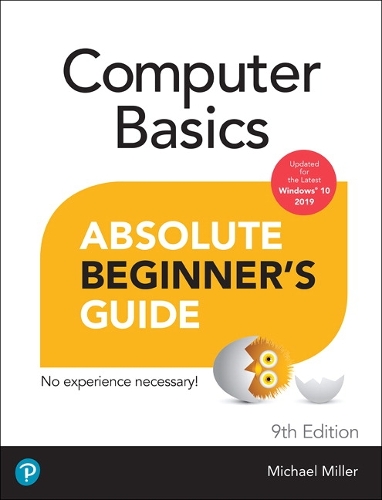
Computer Basics Absolute Beginner's Guide, Windows 10 Edition - Absolute Beginner's Guide
paperback
Published:
28 February, 2020


Popular Books by Michael Miller
View All Books by Michael Miller


Description
This is today’s best beginner’s guide to using your computer or tablet with the Windows 10 operating system. Make the most of your Windows 10 notebook or desktop computer—without becoming a technical expert! This is the fastest way to get comfortable, get productive, get online, get started with social networking, make more connections, and have more fun! Even if you’ve never used a Windows computer before, this book shows you how to do what you want, one incredibly clear and easy step at a time.
Here’s a small sample of what you’ll learn:
- Set up your computer and use the Windows 10 Start menu and desktop
- Connect to the Internet and browse the Web with Microsoft Edge
- Get started with social networking on Facebook, Twitter, Pinterest, and LinkedIn
- Use Windows 10’s built-in apps—and find great new apps in the Windows Store
- Connect printers and external storage, and set up automatic file backup
- Connect to a home wireless network or public Wi-Fi hotspot
- Go online to shop and sell—and smart search with Microsoft Cortana®
- Get work done quickly with Microsoft Office
- Organize, view, and share photos
- Listen to streaming music with Pandora and Spotify
- Watch streaming movies and TV shows with Amazon Prime Video, Hulu, Netflix, and more
- Protect yourself against viruses, spyware, and spam
- Keep your system running reliably at top speed
More Details
| Type | Book |
|---|---|
| ISBN13 | 9780136498810 |
| ISBN10 | 0136498817 |
| Number Of Pages | 352 |
| Item Weight | 520 g |
| Product Dimensions | 176 x 236 x 18 mm |
| Publisher / Reseller | Pearson Education (US) |
| Format | paperback |
| Edition | 9th edition |
GoodReads Reviews
Author's Bio
Michael Miller is a successful and prolific author with a reputation for practical advice, technical accuracy, and an unerring empathy for the needs of his readers. Mr. Miller has written more than 200 best-selling books over the past three decades, which collectively have sold more than 1.5 million copies. His books for Que include My Windows 10 Computer for Seniors, My Facebook for Seniors, My Google Chromebook, My Social Media for Seniors, and My TV for Seniors.
He is known for his casual, easy-to-read writing style and his practical, real-world advice–as well as his ability to explain a variety of complex topics to an everyday audience.
Learn more about Mr. Miller at his website, www.millerwriter.com. Follow him on Twitter @molehillgroup.